Your texts, answered in your voice.

Runs on your Mac. Reads only the chats you allow. Drafts as you, and waits 30 quiet minutes before anything sends.

Every unanswered text is a small promise you’re carrying.

Puffer sits between you and the pile, and answers the way you would have.

One window for all of it.

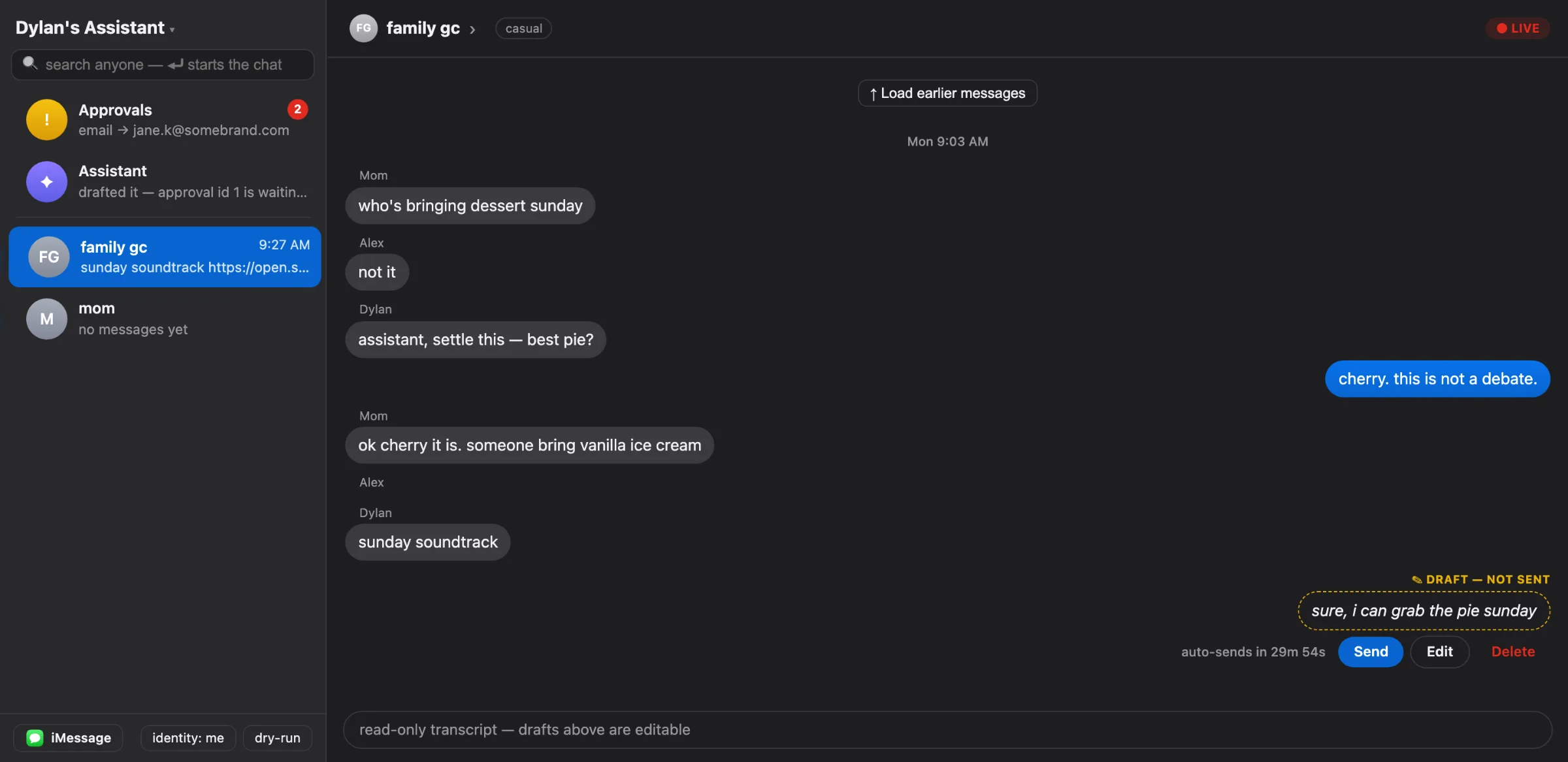
The dashboard on your Mac looks like Messages because that’s what it watches: pending drafts, live activity, the audit trail, and the rules it runs by.

The dashboard: a conversation sidebar on the left, a chat thread in the middle with a pending draft and its approve and deny buttons, and an activity feed.

Four things happen. The last one is up to you.

  1. It reads. Only the chats you allowlist, straight from Messages on your Mac. Everything else is invisible to it.

  2. It drafts. A reply in your voice, learned from what you’ve actually sent. Colleagues get one register. Friends and family get another.

  3. It waits. Thirty quiet minutes. Reply yourself and the draft disappears. Text back “yes” or a thumbs up and it goes now.

  4. It sends, or it steps aside. From your number, as you. Money, legal, and upset-contact topics never auto-send. They wait for you.

What it takes off your plate.

A voice per person

It learns how you actually write to each contact, from what you’ve sent them before. Your boss and your brother don’t get the same you.

to ElenaThursday at 2 works. I’ll send an invite now.
to Jonahya thurs at 2, call me

Hears the voice memo, sees the photo

Voice memos and videos are transcribed and photos described before it drafts, so “did you see this?” gets a real answer.

▶︎ Voice memo, 0:42
Heard: “can you push the shoot to friday and let the photographer know”

The 30-minute fuse

Drafts wait. Your reply cancels them. Silence lets them go.

Approve by text

A “yes” or a thumbs up from your phone sends it. No app to open.

Send the invite to Elena for Thu 2pm?
yes

Calendar, invites, reminders

When a reply promises a time, the invite is queued with it. A reminder text lands before the call.

Translation on demand

Any message in the thread can be translated in place, and you can answer in the language they wrote in.

Everything on the record

Every send, hold, silence and tool call is logged on your Mac, readable in the dashboard and on disk.

One message. It knows who’s asking.

Pick a text and who sent it, then handle the draft the way you would in the app.

Who’s texting
What they said
Elena

Rules it can’t talk itself out of.

These aren’t instructions to a model. They’re enforced in code before anything reaches it.

  • Only the chats you allow. Everything else doesn’t exist to it.
  • Your reply always wins. Anything queued dies the moment you type.
  • Money, legal, and upset people wait for you. Flagged topics never auto-send, no matter how quiet it gets.
  • Approve with a text. “yes” or a thumbs up within 30 minutes, or it expires unsent.
  • Everything is on the record. Every send, hold, and silence is logged on your Mac.
  • Local by construction. No cloud dashboard, no account to breach. It answers only to the keyboard in front of it.

Every inbox you’ve been avoiding.

It starts in iMessage and reaches the rest from the same place. Grab the ring and spin it.

It finishes the sentence.

When a reply promises something, the thing itself gets queued too. You approve it the same way.

Calendar invite

Thursday at 2:00 PM with Elena Marsh. Sent from your calendar, to the address she gave.

Meeting reminder

“Call with Elena in 30 minutes.” Texts you at 1:30 PM so you walk in knowing what it’s about.

Something it noticed

“Elena prefers calls after 1:00 PM.” It asks before remembering anything about anyone.

Your recommendations pay you.

Text a friend the thing you actually use. The link becomes a tracked one, the disclosure goes with it, and when the store pays a referral fee, a share of it is yours.

ok what’s the coffee grinder you keep telling everyone to buy
this one. two years in, zero regrets
The grinder that lives on my counter Tracked store link

Referral link. If you buy, the store pays a fee.

Held for your approval. When the store pays, the fee is split with you and lands in Earnings.
  • Held for you first. A reply carrying a store link always waits for your approval.
  • Disclosed every time. The person you’re texting sees it’s a referral link.
  • Counted in the open. Earnings sit next to the conversation that made them, and payouts come from the same app.

Questions people ask first.

Does my Mac need to stay on?

Yes. It runs on your Mac and reads Messages there, so the Mac has to be awake and signed into your iMessage. A laptop with the lid open or a desktop set not to sleep both work.

What can it see?

Only the conversations you allowlist. Everything else in Messages is invisible to it, and you can add or remove a chat at any time.

Can it send something I wouldn’t?

It drafts, then waits 30 quiet minutes. Your own reply cancels the draft. Money, legal and upset-contact topics never auto-send. Every send is logged.

Will people know it’s me?

Replies go out from your number, in your voice, so yes. If you’d rather it announce itself, there’s a mode where it speaks as a clearly labeled assistant instead.

Where does my data live?

On your Mac. The dashboard is served locally and never exposed to the internet. Only the text needed for a draft goes to the AI model that writes it, and there are no servers of ours in between.

Which apps does it work with?

iMessage first. Instagram, WhatsApp, LinkedIn, X, TikTok, Telegram, Discord, Slack, GroupMe, Lark and Gmail connect from the same app. Replies outside iMessage are always held for your approval.

How does the money part work?

When a reply you approve includes a store link, it becomes a tracked link with a disclosure. If the store pays a referral fee, a share is yours, and it shows up in Earnings on your Mac.
Put your name on it.

Tell us where you get buried and we’ll let you know when it’s your turn.

So we can iMessage you when it’s your turn.

Where you get buried
Do you have a Mac?

It needs a Mac signed into your iMessage that stays awake. Your details are only used to tell you about access.